pkONE® : PkSbbDocumentation
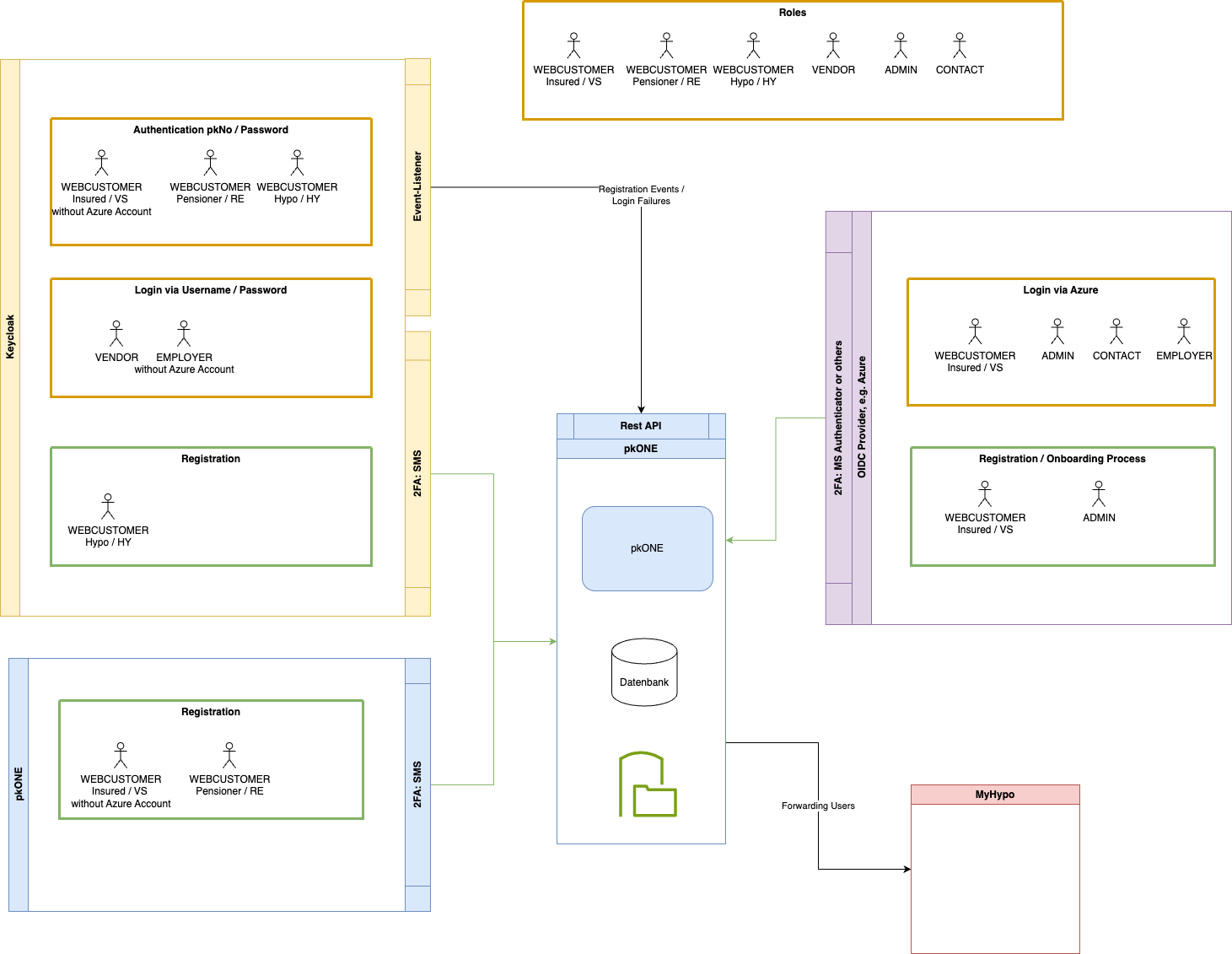
2. Keycloak - Azure Integration
Author: Markus Meixner (markus.meixner@optimizeit.ch)
2.1. Glossary
-
persnr - Nummer, die einen BVG/Hypo-User eindeutig in der Domaene PKSBB identifiziert
-
mypk - mypk = pkONE, BVG Webportal
-
myhypo - Neue Loesung zur Erfassung von Hypotheken
-
GA - Google Authenticator
-
Keycloak / KC - Keycloak authentication server
-
MS - Microsoft
-
IAM - InAppMail (secure mail innerhalb pkONE)
-
IAN - InAppNotification (Benachrichtigungen zu Events innerhalb pkONE)
-
IDP - Identity Provider (z. B. Microsoft Azure)
-
DS - DocumentStore (Bereitstellung Dokumente in pkONE)
-
SSO - Single Sign On (zentrale Authentifizierung von Benutzern, Wechsel von Benutzern zwischen Applikationen wie pkONE oder myHypo)
-
IdP - Identity Provider
-
Subject - One of username, pkNo, email
-
Destinataer / Beneficiary - A person who receives a benefit, typically without obligation.
Common contexts: Insurance: receives a payout after a claim or death. Trusts & wills: inherits money or assets. Social benefits: receives welfare, pension, or support payments. Hypo user is not a beneficiary.
2.2. Dokumenten-Historie
| Version | Datum | Aenderungen | Autor |
|---|---|---|---|
1.0 |
25.06.2025 |
Erstellung Dokument |
M. Meixner |
1.1 |
02.07.2025 |
MS Azure integration, KC - integrated processes |
M. Meixner, P. Silaghi, M. Jurj |
1.2 |
04.07.2025 |
MS Azure integration scenarios, testing environments |
M. Meixner, P. Silaghi, B. Ammann |
1.3 |
07.07.2025 |
Add scope, add technical parts, graphical overview: transient → new user provider, cleanup old stuff, … |
M. Meixner |
1.4 |
27.11.2025 |
Added registration api INFO |
P. Silaghi |
2.3. Motivation
Users/employees of PKSBB / SBB and connected companies (railaway, login, tilo, …) should be able to login via their MS Azure accounts and access the assigned roles within pkONE via the same account. They can use their company Azure authentication for logging into pkONE.
All existing registration and login possibilities should remain as they are:
-
Users not registered in a company Azure app (einige angeschlossene Arbeitgeber haben evtl. keinen Zugriff via Azure)
-
Retired persons (Rentner)
-
Hypo users
-
Testing purposes and test accounts
2.4. Scope of project
Alle Anforderungen, die innerhalb des Projekts umgesetzt werden sollen, sind in diesem Abschnitt aufgelistet. Nicht gelistete Anforderungen sind "out of scope".
-
General
-
Users managed via defined MS Azure (IDP) domains like pksbb.ch, sbb.ch, login.ch, tilo.ch, railaway.ch, sbbcargo.ch can log in via Azure.
-
Roles ADMIN, CONTACT, EMPLOYER, etc. are not restricted to login via MS Azure (cover test accounts, multiple accounts, etc., see also Motivation).
-
Users with multiple roles like ADMIN, CONTACT, EMPLOYER defined with the same business email will be able to switch roles within pkONE.
-
There is no "SuperAdmin" account where a password is known to multiple users (2FA would prevent login anyway).
-
All registration / "password reset" functions for IDP users are out of scope and managed by the domain owners (sbb.ch, pksbb.ch, etc.).
-
-
Keycloak
-
Provide one link for login via MS Azure by registering the KC client with "multi tenant connection" in MS Azure for the pksbb.ch domain.
-
Provide existing authentication and registration for all other users as is (no changes). Users not maintained via MS Azure (valida, lemanis, sbbhistoric, …) log in by existing means and are assigned exactly one role as in the current implementation.
-
-
pkONE
-
IDP users
-
Multiple roles: Provide role switch in pkONE to switch between mapped user roles (IDP users only).
-
IDP user hat offizielle businessEmail, soll aber private email behalten! (Auth MS Azure ueber bspw. x.y@sbb.ch, Notifizierung ueber x.y@bluewin.ch)
-
Insured person/beneficiary via IDP should not see the password change section/cannot change password anymore in pkONE. All other functionalities within "Persoenliche Daten" remain the same.
-
-
NON IDP users
-
Registration
-
All users not covered by IDP can still choose between business email and registration letter (as they do have business mail, but some might not be integrated via IDP). In future registration is only possible via registration letter.
-
Registration letter is still printed via pkONE.
-
-
-
-
HY - Becoming VS
-
No auto migration / user will have 2 logins: via KC / via Azure.
-
-
VS - Partly pensioning, pensioning (RE role)
-
RE accounts (partly pensioning) are still using OIDC provider (as still having active account also)?
-
Process to (auto) migrate VS to RE role is not covered (PKSBB will think about solution, perhaps manual process).
-
-
User synchronisation
-
Users between MS Azure and pkOne are synced as is: daily import from the backend into pkOne with given insurances.
-
If users are already in MS Azure but not synced to pkOne, those users cannot log in.
-
2.5. Covered Use-Cases
| Use Case | Description | Roles | Changes | Process |
|---|---|---|---|---|
UC - Login via IDP (MS Azure) |
Login via Azure fuer alle Benutzer, die in einem IDP der PKSBB oder angeschlossenen Firmen erfasst sind. RE wenn Teilpensionierung. |
All roles but HYPO |
New feature |
|
UC - Login via KC |
Login fuer alle Benutzer, die nicht via IDP erfasst sind. Bspw. auch zusaetzliche Test-Accounts (verschiedene Emails). pkONE: lookup pkNo/email & session setup (roles) via webcustomer/user |
VENDOR, ADMIN, CONTACT, EMPLOYER, VS, RE, HY |
none - existing |
|
UC - Onboarding processes beneficiary - covered domains (IDP / MS Azure) |
Die Registrierung erfolgt durch Arbeitgeber ueber entsprechende Onboarding-Prozesse (ausserhalb pkONE). pkONE:
|
ADMIN, CONTACT, EMPLOYER, VK, VS, RE |
- |
Lookup in pkONE erfolgt ueber die Business-Mail (table user/webcustomer) |
UC - Onboarding processes beneficiary - off domain |
Registrierung / "Forgot password" / "Follow up" processes for all beneficiaries / Destinataer (VS/RE) of domains that are not maintained via an IDP (valida, lemanis, …) registration is done via pkONE |
VS, RE |
none - existing |
not changed |
UC - Onboarding processes HYPO |
Registration / "Forgot password" HYPO is done via KC |
HY |
none - existing |
not changed |
2.6. KC integration Identity Provider
2.6.1. Implementation components & environments
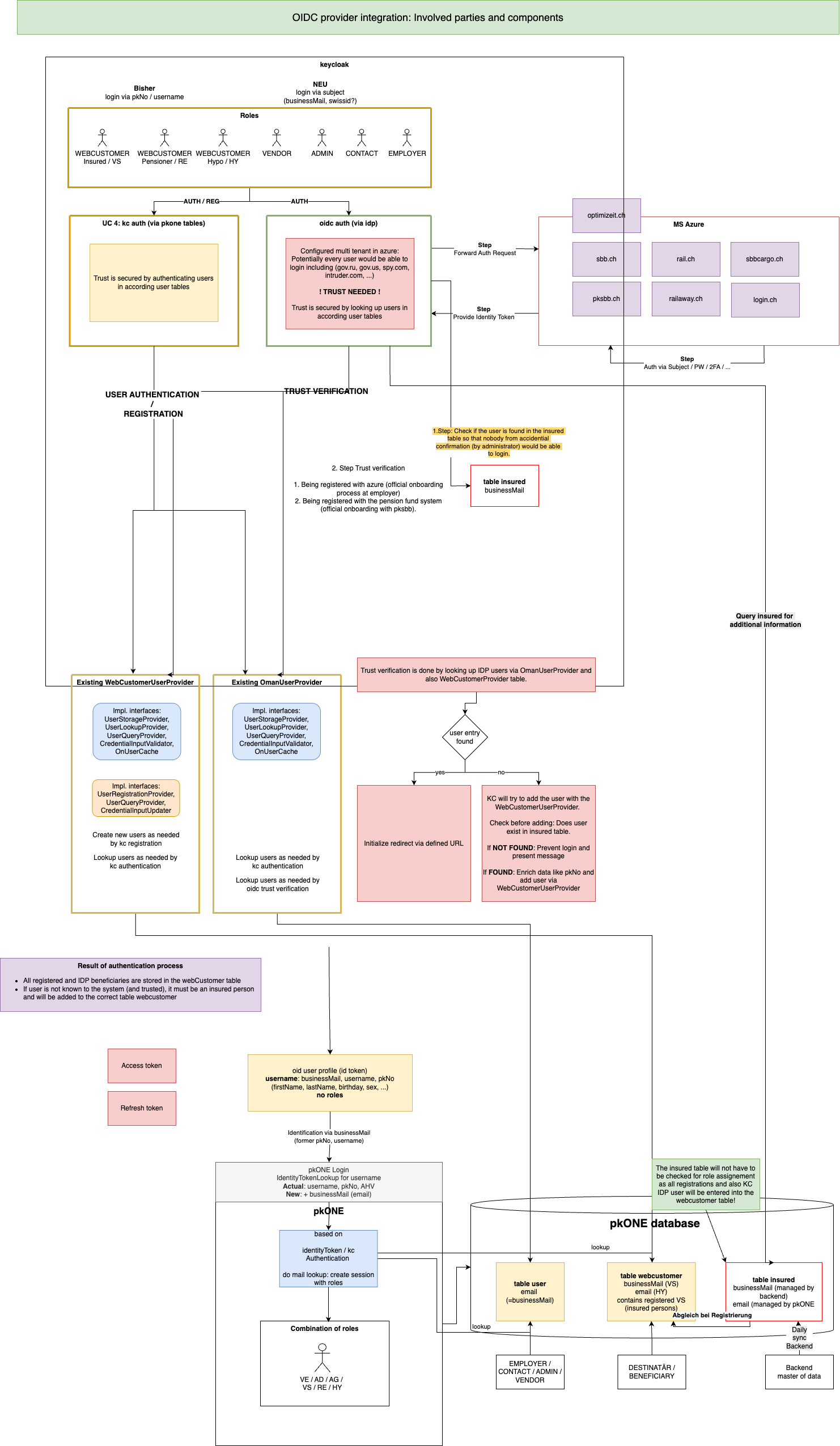
MS Azure connection in KC is configured as multi tenant: potentially every user would be able to login, including (gov.ru, gov.us, spy.com, intruder.com, …). Trust is secured by looking up users in the relevant user tables.
The overview shows involved components and existing/new user providers used to provide trust for the authentication process.
2.7. Processes
2.7.1. Trust check
Add trust gate (check table insured) before KC adds new users to the webcustomer table, so only
users of synced domains (pksbb.ch, sbb.ch, login.ch, …) are allowed for login.
2.7.2. Creating WebCustomer entry
-
Use table
insuredfor enriching the UserAdapter (onlineCommunication, private email, pkNo, …). -
Define which entry is taken.
2.7.3. KC Login caches
-
Keycloak will link the email from azure to KC entity by the username
-
It will cache it in table
BROKER_LINK(and prob. others) -
It will log events in table
EVENT_ENTITY, requests logged:-
auth method:
{ "auth_method": "openid-connect", "auth_type": "code", "response_type": "code", "redirect_uri": "https://mypk-test.pksbb.ch/login/oauth2/code/keycloak", "consent": "no_consent_required", "code_id": "1da61e69-4fcd-4da8-9e75-cbb89842a663", "response_mode": "query", "username": "oldanim" } -
identity-provicer:
{
  "identity_provider": "microsoft",
  "redirect_uri": "https://mypk-test.pksbb.ch/login/oauth2/code/keycloak",
  "consent": "no_consent_required",
  "code_id": "1da61e69-4fcd-4da8-9e75-cbb89842a663",
  "identity_provider_identity": "marika.oldani@pksbb.ch",
  "username": "oldanim"
}
-
2.7.4. Post KC login
-
Modify existing role assignment to consider matching by email additional/instead of username and pkNo.
-
Calculate user roles by querying tables
userandwebCustomer.
2.7.5. pkONE UI OIDC login specific changes
-
"Personal Data" - login via IDP: disable functionality for changing password and mobile number.
2.7.6. Role Switch
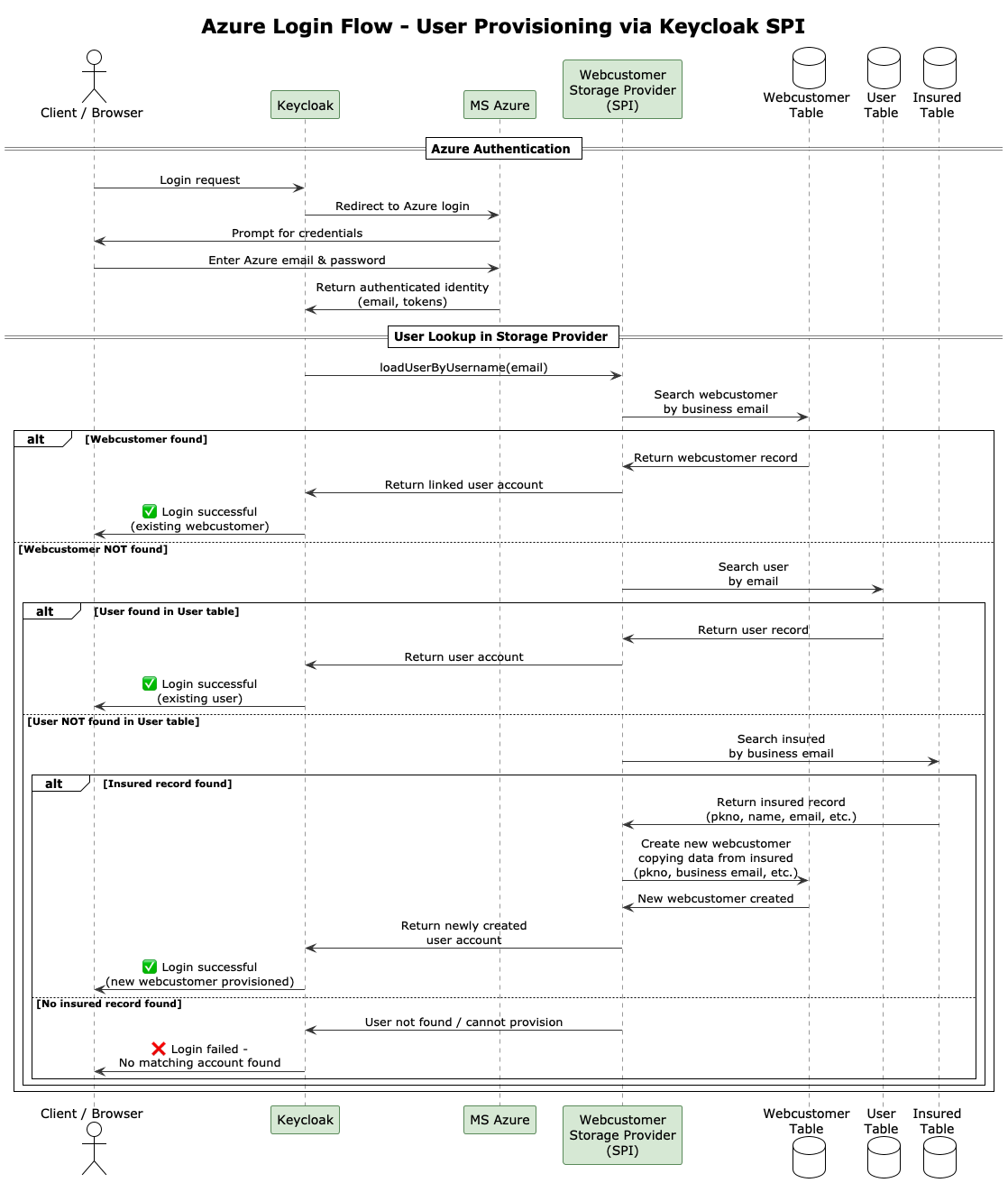
Logging via Azure (user must be in insured):
-
Role switch is always used.
-
Role switch only works on business mail if you log in via Keycloak (not Azure).
-
Lookup is done by business mail in the
usertable and in thewebCustomertable.
2.7.7. Used email for lookup
Welches E-Mail-Attribut (business-mail oder email) in der WebCustomer-Tabelle wird beim KC login durch VS/HY fuer den Lookup benutzt?
if (user instanceof WebCustomer)
    {
        // WebCustomers with HYPO role use regular email field instead of business email
        if(user.hasRole(Role.HYPO))
        {
            return user.getEmail();
        }
        return user.getBusinessMail();
    }
    else
    {
        // For OmanUser and other User types, use the regular email field
        return user.getEmail();
    }
Welche E-Mail-Attribute werden in der WebCustomer Tabelle benutzt um weitere VS/RE/HY-Rollen ausfindig zu machen?
// Lookup user: Only one mail
allRoleUserInfoForEmail.addAll(omanUserService.findAllRoleUserInfos(targetEmail));

// Lookup VS/RE in WebCustomer with businessMail
allRoleUserInfoForEmail.addAll(webCustomerService.findAllRoleUserInfosForBusinessEmail(targetEmail));

// Lookup HYPO in WebCustomer with regular email field
allRoleUserInfoForEmail.addAll(webCustomerService.findHypoRoleUserInfos(targetEmail));
2.8. Aktuelle Umsetzung Azure login
| Use Cases | No webcustomer and no user account | webcustomer account | webcustomer and user account | user account only (hypothetical, can be ignored) |
|---|---|---|---|---|
AUTHENTICATION |
||||
can login (if entry in insured)? |
yes |
yes |
yes |
yes |
webcustomer existing? |
no |
yes |
yes |
no |
webcustomer created? |
yes |
no |
no |
no |
ROLE SWITCH |
||||
Hit Webcustomer table |
yes |
yes |
yes |
no |
Hit user table |
no |
no |
yes |
yes |
Role Switch visible |
no |
no |
yes |
no |
2.9. Login Prozess MS Azure
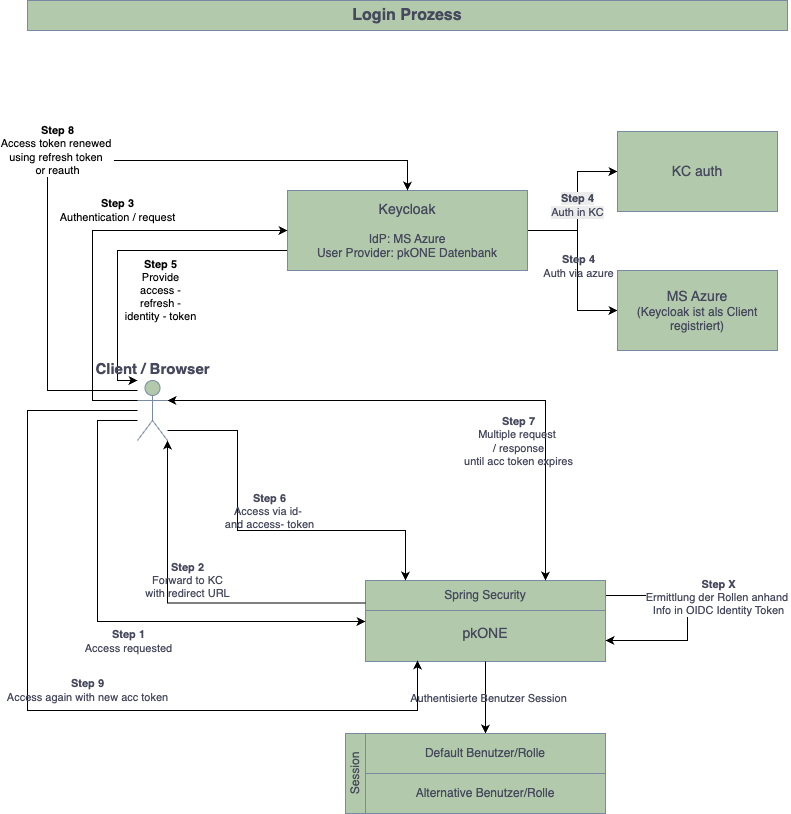
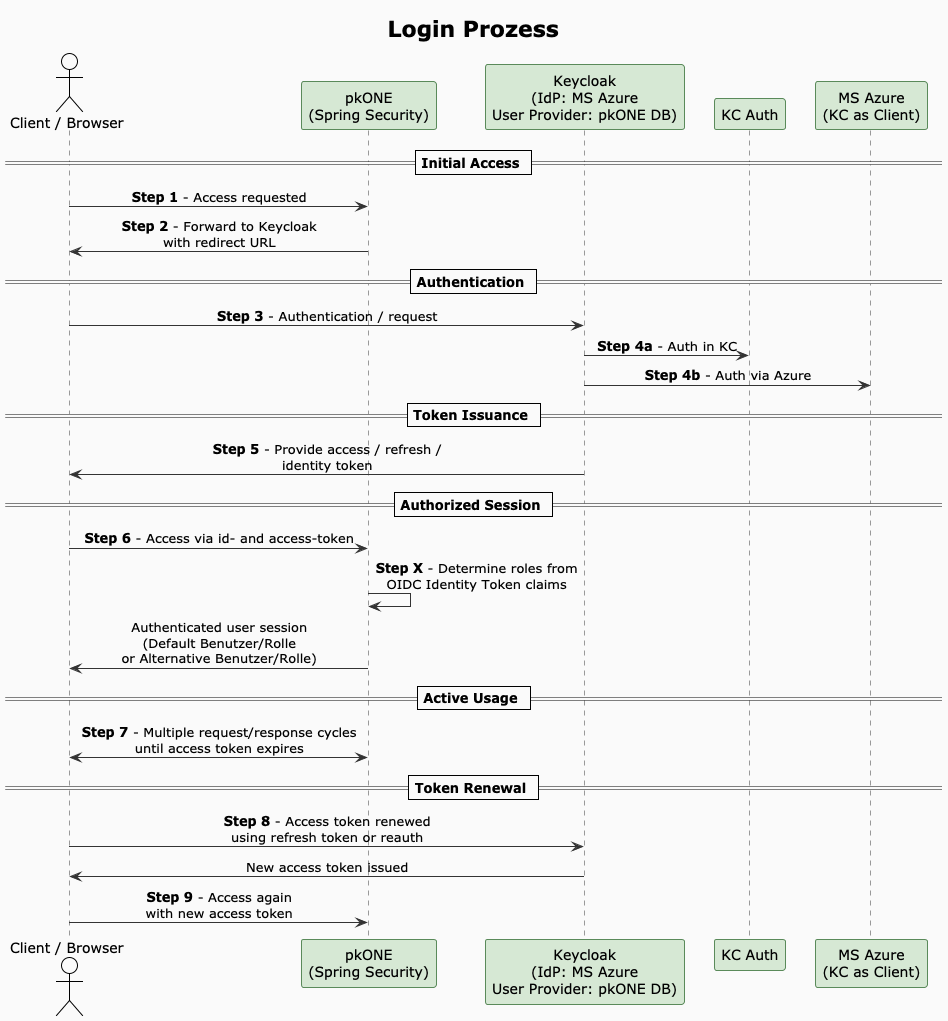
Summary:
-
Client Request to App (
https://<pkone-url>;) -
App Redirect Request to Keycloak for Authentication
-
Keycloak Request to Azure (includes the user mail)
-
Azure Callback Reply including a code + state to Keycloak (
https://<kc-url>/realms/pkone/broker/microsoft/endpoint) -
Keycloak exchanges the code against a token and makes a Callback Request to the App (
http://<pkone-url>/login/oauth2/code/keycloak?…;) -
App confirms Login and loads the web content
2.10. Rest-API pkONE
Rest-API for a couple of services (WebCustomerService / InsuranceService) supports the following functionality:
2.10.1. Microsoft WebCustomer Registration Endpoint
Endpoint: POST /api/registration/microsoft-webcustomer
Purpose: Called by Keycloak event listener when a user registers via Microsoft login, triggering DEST mutation creation in pkONE.
Authentication:
-
Requires
X-API-Keyheader with valid API secret -
Secret configured via environment variable
PKONE_REGISTRATION_SECRET
Request Headers:
Content-Type: application/json
X-API-Key: <api-secret>
Request Payload:
{
  "pkNo": "string"
}
Response (Success - Mutation Created):
{
  "success": true,
  "webCustomerId": "string",
  "mutationCreated": true,
  "mutationId": 12345
}
Response (Success - No Mutation):
{
  "success": true,
  "webCustomerId": "string",
  "mutationCreated": false
}
Response (Error):
{
  "success": false,
  "errorCode": "VALIDATION_FAILED",
  "message": "string",
  "details": {}
}
HTTP Status Codes:
-
200 OK: WebCustomer processed successfully (no mutation created) -
201 Created: WebCustomer processed and DEST mutation generated -
400 Bad Request: Invalid request data -
401 Unauthorized: Missing API key -
403 Forbidden: Invalid API key -
404 Not Found: WebCustomer not found for pkNo -
500 Internal Server Error: Server processing error
2.10.2. Ping Endpoint (API Key Verification)
Endpoint: GET /api/registration/ping
Purpose: Verify API connectivity and API key validity. Called automatically by Keycloak on startup to validate configuration.
Authentication:
-
Requires
X-API-Keyheader with valid API secret
Response (Success):
{
  "status": "ok",
  "timestamp": 1732635000000,
  "service": "microsoft-registration"
}
HTTP Status Codes:
-
200 OK: API key is valid, service is healthy -
401 Unauthorized: Missing API key -
403 Forbidden: Invalid API key
Manual Testing with curl:
# Test ping endpoint
curl -H "X-API-Key: YOUR_API_SECRET" http://localhost:8080/api/registration/ping

# Test registration endpoint
curl -X POST -H "Content-Type: application/json" -H "X-API-Key: YOUR_API_SECRET" \
  -d '{"pkNo":"123456"}' http://localhost:8080/api/registration/microsoft-webcustomer
Keycloak Startup Verification:
On Keycloak startup, check logs for:
-
Success:
"Successfully verified pkONE API connectivity - API key is valid" -
Invalid key:
"pkONE API key verification FAILED - invalid API key (HTTP 401)"or"…(HTTP 403)" -
Connection failed:
"Cannot reach pkONE API at {url} - service may not be running"
3. Role Switch
Der Role Switch loest das Problem bei der PKSBB, dass nur 1 business email fuer Azure login existiert. Der letzte Vorfall hat aufgezeigt, dass das Feature das System fuer Angriffsvektoren oeffnet. Die folgende Tabelle zeigt Massnahmen plus eine Risikobewertung der Massnahmen, bzw. eine Empfehlung durch den VENDOR.
Email - Switch in KC?
| Code | Feature | Functionality | Description | Risk assessment | MoSCoW Empfehlung | Implementiert |
|---|---|---|---|---|---|---|
Role Switch |
||||||
Login-Lookup |
Nutzung Business-E-Mail, als auch privat gesetzte E-Mail fuer den Lookup, d.h. RE/Hypo-User werden unterstuetzt. |
ja |
||||
LLBE |
Es darf NUR die Business-Email (nicht die private E-Mail) fuer den Lookup in der WebCustomer-Tabelle verwendet werden: |
High |
Must have |
nein |
||
Rolle aendern |
Limitierung auf 2 Rollen: UserRole + VS (bspw. ADMIN + VS / AG + VS) |
nein |
||||
RCRA |
Step-up / Re-authentication fuer privileged roles: Beim Wechsel in Arbeitgeber/Admin: erneute Authentifizierung |
High/Medium |
Nice to have |
nein |
||
RCTO |
Step-up / Re-authentication fuer privileged roles: Admin-Aktionen immer mit zusaetzlicher Bestaetigung / MFA (bspw. Senden von Code an E-Mail, Code muss bei Wechsel eingeben werden) |
High/Medium |
Must have |
nein |
||
RCPR |
Einstiegs-Rolle immer die am tiefsten privilegierte, dann koennte ein Switch von bspw. HY-Rolle auf eine andere Rolle unterbunden werden. Wahrscheinlich eher benutzerunfreundlich fuer ADMIN-Team |
Low |
Durch LLBE mitigiert |
nein → heute schon implementiert |
||
RCNO |
Hypo-Rolle: Ueberhaupt kein Switch moeglich (Login via KC, not azure) |
Low |
Durch LLBE mitigiert |
nein → weglassen |
||
Email aendern |
E-Mail-Inhaberschaft ueperpuefen (Bestaetigungslink mit Token) → (darf nicht vorhanden sein) Link verschicken, Link anklicken, loest SMS aus, wenn bestaetigt, dann E-Mail Adresse aendern. |
High |
Must have |
nein |
||
E-Mail kann nicht auf bestehende E-Mail geaendert werden → ok |
High |
Must have |
ja |
|||
Ruecksetzung der E-Mail auf die eigene Business-Mail moeglich? → Loeschen moeglich |
Low |
PKSBB Entscheid |
ja |
|||
Blacklisting: Not allowed to choose email from blacklisted domains - future entries in those domains will therefore be covered → hinfaellig, wg. Bestaetigung |
Medium |
Durch REIN mitigiert |
nein |
|||
Registrierung in pkONE (RE/VS) / in KC (HY) |
Ueberpruefung der Email auf bestehende E-Mail → "Meld Dich bitte mit Deiner E-Mail an, E-mail schon vorhanden" |
High |
Must have |
? / ja |
||
Ruecksetzung der E-Mail auf die eigene Business-Mail: gestrichen |
Low |
PKSBB Entscheid |
nein |
|||
Blacklisting: Blacklisted domains are not allowed at all - future entries in those domains will therefore be covered: Bei Verifizierung Email hinfaellig |
Medium |
Durch REIN mitigiert |
nein |
|||
REIN |
E-Mail-Inhaberschaft ueberpruefen (Bestaetigungslink mit Token), s. oben |
High |
Must have |
nein |
||
Audit & Logging (DB) |
Audit-Logging fuer Support / Admin-Dashboard - Protokollierung wer, wann, von welcher IP, von-nach fuer Role-Switch, Email-Change, etc. → dediziert ins audit log > Statistik in ADMIN-Dashboard |
High |
Must have |
Logging mit naechstem Release / nein |
||
Notifikation |
- Mail/SMS an Account-Inhaber bei Rollenwechsel (falls es ein anderer Benutzer war) → |
High |
Must have |
nein |
3.1. Flow-Definition: Sicherer E-Mail und Rollenwechsel
-
Nutzer klickt "Rolle wechseln zu X" in UI.
-
Server erstellt single-use, signed token (ID, user_id, requested_role, exp) und speichert Hash(token) in DB mit Status=issued.
-
Server sendet E-Mail mit Token (oder Link:
https://app.example/role-switch?token=<token>;)-
Link kurzlebig (10-15min), Single-use.
-
-
Eingabe Token (oder Klick auf Link → serverseitige Validierung)
-
Token gueltig, nicht verwendet, IP/UA optional pruefen.
-
(Wenn Rolle sensibel → zwingende Re-auth (password + MFA) → erst danach Rolle aktivieren.)
-
-
Bei Erfolg (teilweise implementiert)
-
Nur Rollenwechsel: Erstelle neue Session (Session-ID neu), setze Rollenclaims serverseitig, markiere Token verwendet.
-
Nur Rollenwechsel: Sende Benachrichtigung an E-Mail ("Rolle X aktiviert um hh:mm, falls nicht von Ihnen, klicken Sie hier").
-
Log Eintrag erstellen (user, old_role, new_role, IP, user_agent, token_id).
-
-
Bei Verdacht:
-
Schloss / Deaktivierung des Accounts, Benachrichtigung Support, erzwungene Passwortaenderung.
-
3.2. Sicherstellen
| Feature | Functionality | Description |
|---|---|---|
Cross-Boarding |
Sicherstellung, dass beim Wechsel von VS auf RE die Business-E-Mail geloescht wird |
|
Off-Boarding |
Sicherstellung, dass beim Austritt die Business-E-Mail geloescht wird |
|
Token-Handling |
Sichere, serverseitig erzeugte Tokens |
3.3. Role switch: Aktuelle Verwendung E-Mails
-
Welches E-Mail-Attribut (business-mail oder email) in WebCustomerTabelle wird beim KC login durch VS/HY fuer den Lookup benutzt?
if (user instanceof WebCustomer)
{
    // WebCustomers with HYPO role use regular email field instead of business email
    if (user.hasRole(Role.HYPO))
    {
        return user.getEmail();
    }
    return user.getBusinessMail();
}
else
{
    // For OmanUser and other User types, use the regular email field
    return user.getEmail();
}-
Welche E-Mail-Attribute werden in der WebCustomer Tabelle benutzt um weitere VS/RE/HY-Rollen ausfindig zu machen
// Lookup user: Only one mail
allRoleUserInfoForEmail.addAll(omanUserService.findAllRoleUserInfos(targetEmail));

// Lookup VS/RE in WebCustomer with businessMail
allRoleUserInfoForEmail.addAll(webCustomerService.findAllRoleUserInfosForBusinessEmail(targetEmail));

// Lookup HYPO in WebCustomer with regular email field
allRoleUserInfoForEmail.addAll(webCustomerService.findHypoRoleUserInfos(targetEmail));
3.4. Aktuelle Umsetzung Azure login
| Use Cases | No webcustomer and No user account | webcustomer account | webcustomer and user account | user account only (hypothetical, can be ignored) |
|---|---|---|---|---|
AUTHENTICATION |
||||
can login (if entry in insured)? |
yes |
yes |
yes |
yes |
webcustomer existing? |
no |
yes |
yes |
no |
webcustomer created? |
yes |
no |
no |
no |
ROLE SWITCH |
||||
Hit Webcustomer table |
yes |
yes |
yes |
no |
Hit user table |
no |
no |
yes |
yes |
Role Switch visible |
no |
no |
yes |
no |
3.5. Referencing Tickets
-
#7668 - Rollenwechsel - Uebernahme fremder Rollen